Locus Studio
The pattern software I built, because nothing else worked the way the patterns do.
Every pattern I draw starts the way these patterns have always started, with a compass and a straightedge. The construction is the design. Every step stands on the ones before it.
No drawing tool was built that way. Other software keeps the shapes but not the reasoning behind them, so one early change means redrawing everything after it. At the scale of a facade, that is an afternoon against a week.
So I built Locus Studio.
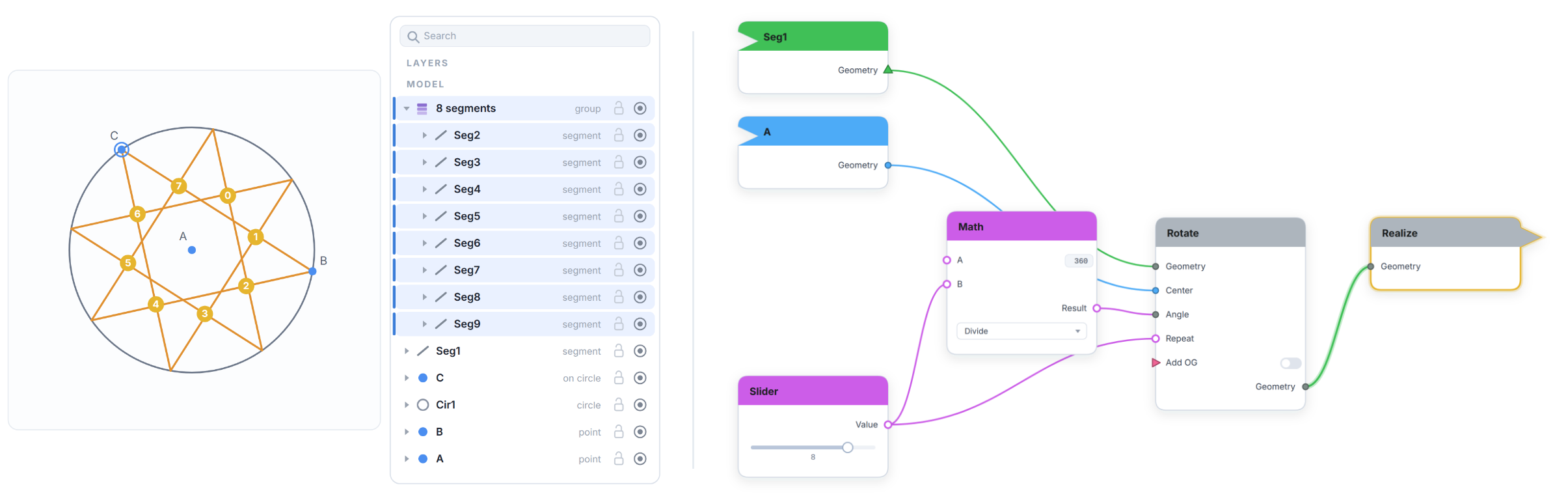
It remembers how you built the pattern. Change an early move and everything downstream rebuilds itself.
You draw with compass and straightedge. When a line just needs to be a curve, there is a pen: anchors, handles, splines you can cut, close and reshape, in the same document as the constructed geometry rather than in a second program.
Two windows sit side by side. On the left is the drawing canvas, which looks like the paper you already work on. On the right is a visual programming language. It can take what you have drawn as its input, or build a pattern from nothing at all.
Drop a motif into a repeat and you get the entire field back, along with the single unit it repeats from, in any of the ways a pattern can tile a plane.
Finished work comes out as vectors, at any size, ready for whatever comes next.
Mac and Windows, seven languages, a full manual, and a public issue tracker. Free to download.
Bug reports and ideas are welcome from everyone.